Loading...
Loading...

 Built into Swivl
Max is the AI chief of staff built into Swivl. Ask it anything about your business in plain English — it answers with your real numbers, then does the work: sends the invoice, chases the payment, fixes the schedule.
Included in every Swivl account, on the free plan. Nothing to install.
Ask another tool who owes you money and you get a summary to act on later. Ask Max and the reminders are already sent.
Am I overbooked tomorrow?
Yes — two jobs both start at 10:00 AM. The Delgado service call has a two-hour window; the Ramos install doesn't.
Moved the Ramos install to Friday 8:00 AM and texted the customer.
Invoice the Hendersons for today's work.
Pulled today's job: 6.5 hours, materials, and one trip.
Created invoice #1084 and sent it.
 Does For Your Business
Your AI partner that learns your way of doing business and scales your expertise across every customer touchpoint
Ask MaxAm I overbooked tomorrow?
Two jobs both start at 10. The Delgado call has a window; the Ramos install doesn't.
Moved Ramos to Friday 8am and texted them.
The whole thing runs on the phone, and Max talks back. Ask it anything from the truck in plain English — it answers from your live jobs, customers and invoices, then does the work.

MAX Handles calls with a friendly tone, capturing leads, booking jobs, and syncing everything directly to your Swivl CRM.

With short recorded videos. MAX AI summarizes issues, extracts details, and automatically sends everything straight to the estimator.

MAX instantly pulls job details, applies your price book, and creates ready-to-send quotes, so you just review and hit send.

MAX helps you build a website featuring your services, along with a booking form that's tailored to match your brand's voice.

Send accurate quotes instantly and secure jobs before anyone else even gets their first draft ready.

From call to quote, everything feels seamless, polished, and professional—building trust with every customer.
Does For Your BusinessYour AI partner that learns your way of doing business and scales your expertise across every customer touchpoint
Ask MaxAm I overbooked tomorrow?
Two jobs both start at 10. The Delgado call has a window; the Ramos install doesn't.
Moved Ramos to Friday 8am and texted them.
Ask about your business…
The whole thing runs on the phone, and Max talks back. Ask it anything from the truck in plain English — it answers from your live jobs, customers and invoices, then does the work.
MAX Handles calls with a friendly tone, capturing leads, booking jobs, and syncing everything directly to your Swivl CRM.
With short recorded videos. MAX AI summarizes issues, extracts details, and automatically sends everything straight to the estimator.
MAX instantly pulls job details, applies your price book, and creates ready-to-send quotes, so you just review and hit send.
MAX helps you build a website featuring your services, along with a booking form that's tailored to match your brand's voice.
Send accurate quotes instantly and secure jobs before anyone else even gets their first draft ready.
From call to quote, everything feels seamless, polished, and professional—building trust with every customer.
 in Action
Designed by marketers, for marketers. Swivl gives you the guidance, data and innovation you need to become a better marketer.
 in Action
See Max in action, your front desk, estimator, and on-site assistant all packed into one smart AI.
 Your numbers, not the internet's
No copy-pasting into a chatbot. No generic advice about what contractors should do. Max reads the same records you do, and only yours.
What should I know today?
Four jobs on the board, $7,860 outstanding, and two estimates waiting on a callback.
Flagged the two follow-ups on today's schedule.
Who's the customer on Young Road?
Delgado Residence, 214 Young Road. Two jobs since March, both paid on time. Last service was a condenser replacement in June.
Opened the customer record.
Start a chat with our AI receptionist and see how naturally it handles questions, bookings, and customer conversations, just like an office assistant would.

Start a chat with our AI receptionist and see how naturally it handles questions, bookings, and customer conversations, just like an office assistant would.
 Claude
 ChatGPT
Swivl runs an MCP server. Add it once as a custom connector and your assistant can read your customers, jobs, estimates and invoices — and create them — without leaving the chat window you already work in.
In Claude, hit the + beside the message box, then Connectors.
Add connector, then Add custom connector.
Name it Swivl, paste the address below, hit Continue, and log in once.
https://mcp.swivl.tech/mcpThe walkthrough shows Claude. ChatGPT takes the same address as a connector in its settings. Either way you sign in as yourself, so the assistant sees exactly what your Swivl login sees — no more.
What people actually do with it once it's connected →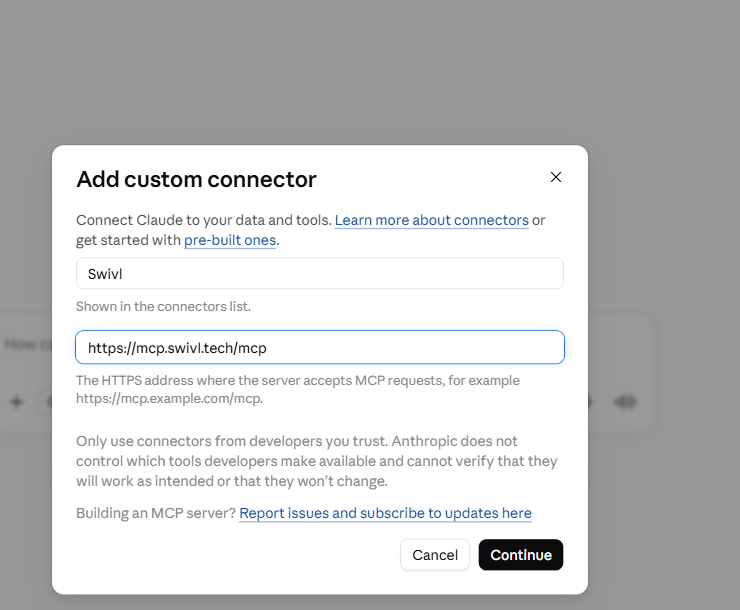 Learns Your Business
Train your AI once, then let it scale your expertise across every job and every customer interaction
Setting up MAX is simple. You add your business info, preferred script, pricing details, and more about your business, and MAX starts working like you.
The more you share, pricing updates, and service details, the more accurate and relevant MAX becomes.
Use MAX wherever you need it most, on your phone lines, in your CRM, or out in the field. It connects the dots between your front office and your technicians seamlessly.
With MAX handling the repetitive stuff, your team can move faster, completing more jobs, creating estimates instantly, and giving every customer a prompt, professional experience.
Learns Your BusinessTrain your AI once, then let it scale your expertise across every job and every customer interaction
Setting up MAX is simple. You add your business info, preferred script, pricing details, and more about your business, and MAX starts working like you.

The more you share, pricing updates, and service details, the more accurate and relevant MAX becomes.

Use MAX wherever you need it most, on your phone lines, in your CRM, or out in the field. It connects the dots between your front office and your technicians seamlessly.

With MAX handling the repetitive stuff, your team can move faster, completing more jobs, creating estimates instantly, and giving every customer a prompt, professional experience.
Max can only see and do what the signed-in user is already allowed to. A tech can't pull financials through Max any more than through the app.
When Max sends an invoice or moves a job, it says so in the conversation. Nothing happens to your business off-screen.
Chat history syncs across devices, so the question you asked from the driveway is waiting on your desktop.
Everything you need to know about how MAX works, how it connects to your business, and how quickly you can get started.
Everything you need to know about how MAX works, how it connects to your business, and how quickly you can get started.
Join field service professionals using MAX to protect margins and grow their business