
What is the best free estimate app for contractors, and can AI write the estimate?
Most contractor estimate apps are free only for a 14-day trial. Swivl Starter is $0 forever with unlimited estimates you write yourself. AI can draft one for about 60 credits, but you still check the costs.
-2.webp)
Rob Heller
Published Oct 15, 2026
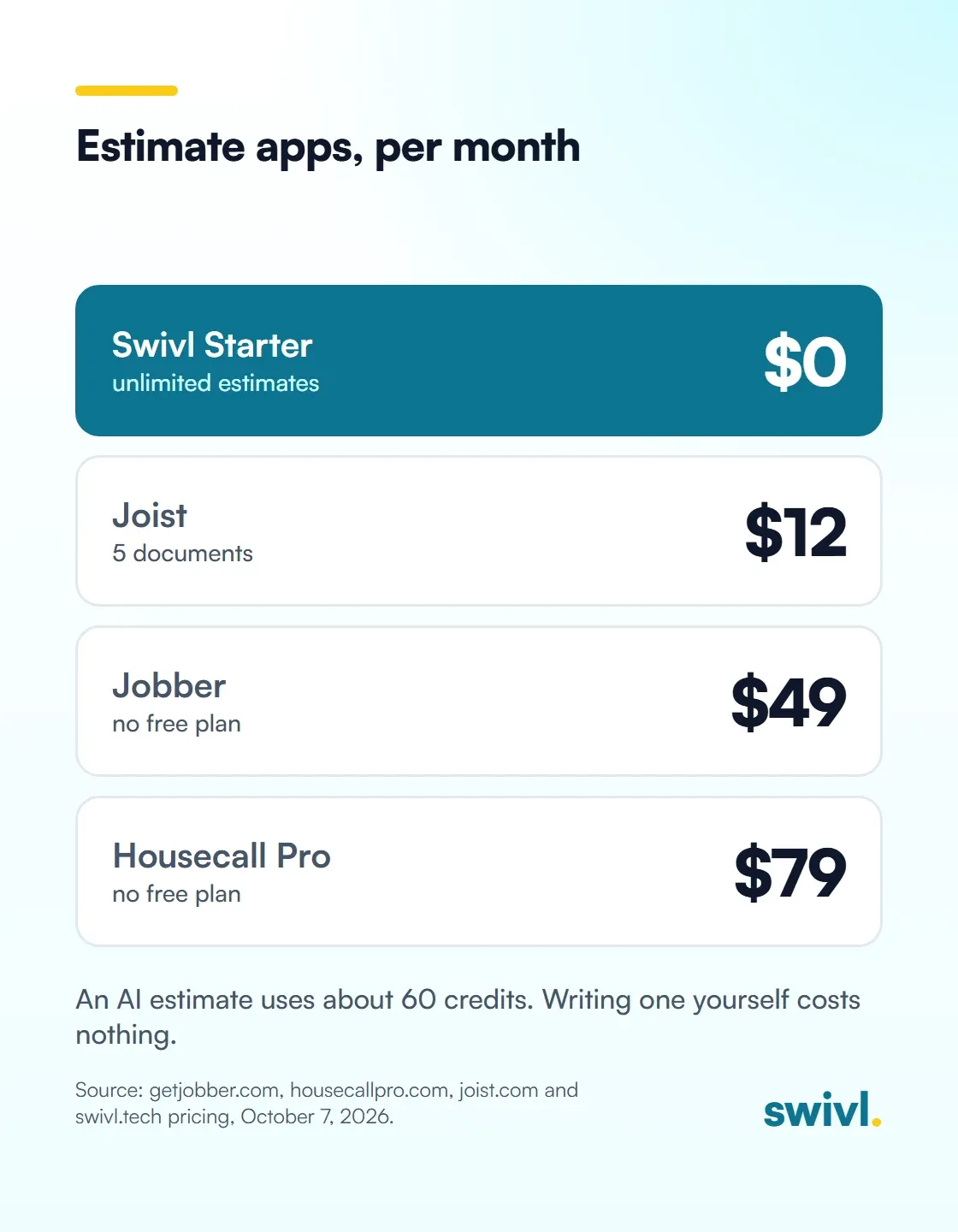
Table of Contents
Share this article
Most estimate apps contractors hear about are free only for a 14-day trial. Swivl's Starter plan is $0 forever with unlimited estimates you write yourself, plus invoicing and scheduling. AI can draft the estimate too, at about 60 credits each, but you still check the costs and set the margin.

Search for a free estimate app and you'll find a lot of free trials. That's a different thing. A trial runs out in two weeks, right about when you've loaded your customers and your prices, and then you're picking a plan.
So here's what's actually free, what it costs after that, and whether you should let AI write your estimates.
Which estimate apps are actually free?
I checked the pricing pages of the names contractors ask about most, today. Here's where they stand:
- Jobber: no free plan. Core is $49 a month with no commitment, or $29 a month paid annually, for one user, plus $29 a month for each added user. You get a 14-day trial of the Grow plan with no card. Core does include quotes. (pricing, checked October 7, 2026)
- Housecall Pro: no free plan. Basic is $79 a month, or $59 a month billed annually, with one user, and it includes estimates and invoicing. 14-day trial, no card. (pricing, checked October 7, 2026)
- Joist: its free plan is gone. Their pricing FAQ says so directly. Basics is $12 a month and covers up to 5 documents a month, and Pro is $17. 14-day trial. (pricing, checked October 7, 2026)
- Swivl: Starter is $0 a month, free forever, with no trial clock. Unlimited users, customers, jobs, estimates and invoices. (pricing, checked October 7, 2026)
To be fair to the others, each of them does something well. Joist is cheap and simple if all you need is a handful of good-looking estimates a month. Jobber's Core plan is a solid one-person setup with quotes, invoices and online payments, and plenty of owners run on it happily. Housecall Pro is built for crews that want online booking, financing and review tools in one place. None of them is free after two weeks, and that's the question you asked.
What does a free estimate app need to do?
An estimate app earns its keep if it does four things. Anything less and you're back to a spreadsheet and a PDF.
- Build the estimate on site, from your phone. The customer is standing in the kitchen. The guy who quotes before he leaves usually gets the job.
- Let the customer approve it from their phone. No printing, no signing, no scanning.
- Keep the estimate, the job and the invoice together without retyping. In Swivl the job is the folder, and the estimate, visits and invoice all live inside it.
- Show you what the job really cost. An estimate you never check against actuals is a guess with a logo on it.
That last one matters more than any feature list, and I learned it the expensive way.
Why does it matter who prices the job?
At our plumbing company we once landed a job far bigger than anything we'd ever done, and we were in over our heads. I'd handed the pricing to someone else. He came in at maybe a quarter of what it should have been.
Of course we got the job. It went sideways fast. We tried to submit change orders and got a lot of pushback. In the end, thank God, they fired us off the job without holding our feet to the fire. On jobs that size you usually commit with financial backing like a bond, and they could have really done us in if they'd wanted to.
The lesson I learned: the estimate is where you make or lose the money, so you have to know what's in it. That's true whether a person writes it, a template writes it or AI writes it. Any app that hides the cost behind a final price is setting you up for the same mistake.
Can AI write a contractor estimate?
Yes, and it's good at the parts people skip. In Swivl, you describe the job and Max, our AI estimator, builds the estimate from your own pricing. It estimates what the job will cost you first, in six categories: labor, materials, tools and equipment, vehicles, subcontractors and other. Then your markup goes on top to get the customer price.

A short from Swivl: describe the work and the AI Estimator builds the estimate from your own pricing, covering labor, materials and your markup, and the customer approves it from their phone.
Here's my honest take on where AI helps and where it doesn't:
- It helps on mixed-scope jobs. A bathroom refresh with a vanity, a faucet, drywall patching and paint has a long materials list. That's where people forget the small stuff, and the small stuff adds up.
- It helps at 9pm. When you're writing estimates after a full day in the field, a first draft saves real time.
- It doesn't replace your judgment. You still check the labor hours, the drive time and the margin. You know the customer and the house. The software doesn't.
- It isn't free. On Swivl, an AI estimate costs about 60 credits. A short one costs less, and one with a lot of photos and a long materials list costs more.
A walkthrough of how Swivl prices a 50-gallon gas water heater replacement. Max estimates your cost in six categories, labor cost comes from hourly rate plus labor burden, materials can match live store pricing, and your default markups from the pricebook are added to reach the customer price. Jump to cost + markup = price at 2:06.
How much does an AI estimate cost on Swivl?
Writing an estimate yourself is always free and unlimited, on every plan. The AI Estimator uses credits, and the rate is the same on every plan.

- Starter, $0 a month: 250 credits a month, about 4 AI estimates.
- Growth, $49 a month: 1,500 credits a month, about 25 AI estimates.
- Scale Pro, $149 a month: 4,800 credits a month, about 80 AI estimates.
- New accounts start with 14 days on Scale Pro at no charge, no card required, then move to Starter unless you pick a paid plan.
One trade-off to know up front: on Starter you can't buy extra credits. If you want more than about 4 AI estimates a month, you move up to Growth. Most solo contractors I talk to write the simple ones themselves and save the AI for the big, messy ones.
Which free estimate app should you pick?
Pick on what happens after the estimate. They all make a decent-looking PDF.
- If you write a few estimates a month and want the cheapest paid tool, Joist Basics at $12 is hard to beat, as long as 5 documents a month covers you.
- If you're one person and want a well-known, polished app, Jobber Core works, and it gets pricier as you add people.
- If you want estimates, invoices, scheduling and job costing at $0 with no trial clock and no per-user fee, that's why we built Swivl the way we did.
For more on the craft of the estimate itself, read the best way to write an estimate for small jobs, mastering AI estimating and fixing handyman estimating with flat-rate pricing.
Frequently asked questions
Is there a truly free estimate app for contractors?
Yes. Swivl's Starter plan is $0 a month, free forever, with unlimited estimates you write yourself, plus invoicing, scheduling and unlimited users. Jobber, Housecall Pro and Joist offer 14-day free trials but no free plan (checked October 7, 2026).
Does Joist still have a free plan?
No. Joist's pricing page says its free plan is no longer available. It offers a 14-day trial, and Basics starts at $12 a month for up to 5 documents a month (checked October 7, 2026).
Can AI write my estimates for me?
It can draft them. In Swivl, the AI Estimator estimates your cost in labor, materials, tools and equipment, vehicles, subcontractors and other, then adds your markup. You should still check the hours, drive time and margin before you send it.
How much does an AI estimate cost?
On Swivl, about 60 credits per estimate, at the same rate on every plan. Starter includes 250 credits a month, about 4 AI estimates. Writing an estimate yourself is free.
Can customers approve estimates from their phone?
In Swivl, yes. The customer gets the estimate and approves it from their phone, and the approved work stays inside the job with the visits and the invoice.
Free to start. No contract. No sales call.
Start freeReady to transform your business?Transform your business
Join thousands of contractors already growing with Swivl's AI-powered platform.