
What is the best HVAC dispatch software for a small company?
What a small HVAC shop needs from dispatch software, what a 4-tech crew pays at Swivl, Jobber, Housecall Pro and ServiceTitan, and when each one fits. Swivl includes dispatch free with unlimited users.

Rob Heller
Published Oct 22, 2026
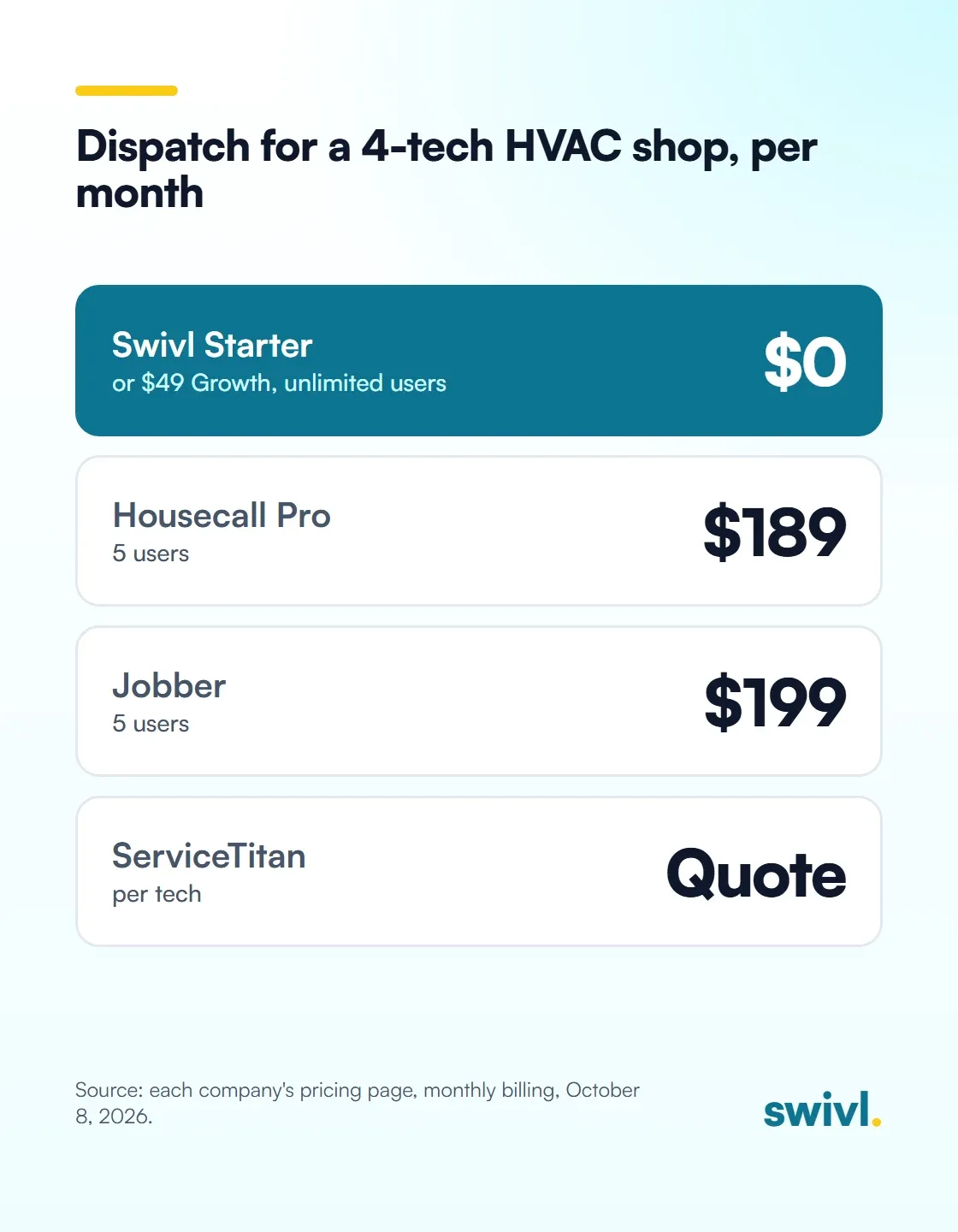
Table of Contents
Share this article
Follow us on Facebook
We post our customers’ work — the jobs, the before and afters, the trucks. Come and have a look.
For a 1 to 5 truck HVAC company, the best dispatch software is a drag-and-drop board your office and techs both see, priced for the whole crew. Swivl's Starter plan includes scheduling and dispatch for $0 with unlimited users. Housecall Pro Essentials is $189 a month for 5 users, and ServiceTitan prices by quote per technician.

In July, dispatch is the whole business for an HVAC shop. The phone rings with no-cool calls from 7am on, every tech is already booked, and somebody has to decide who goes where. If that somebody is you, from a ladder, with a paper schedule in the truck, things get missed.
Good dispatch software puts every job on one board that the office and the techs both see. For a small shop, the right pick is the one that does that well without charging you for each tech you add. Here's what to look for and what it costs.
Why is dispatching more than a few techs so hard?
Dispatching more than a few techs in the field is tough. There's a lot to consider: the customer's availability, each tech's skill set and skill level, the drive time, tomorrow's schedule and more. Get it right and the payoff is massive. Drive time savings alone is huge.
I recognize the pain other owners feel when they see their techs zigzagging all over town, driving past each other in rush hour traffic. Every one of those trips is time nobody is paying you for.
Swivl solves part of it today. It calculates how much time your techs spend driving versus on the job or on supply runs. That data at least gives you better insight into the problem.
We're also building AI to optimize those routes and tell you roughly what each dispatch change saves the company. It's coming soon, and it isn't in Swivl yet. I think AI will handle all of these moving pieces much better than any human could.
What does HVAC dispatch software need to do for a small shop?
For a company with one to five trucks, I'd want these covered before anything else:
- A drag-and-drop board, so moving a no-cool call to the tech who just finished a tune-up takes one move.
- A mobile app for every tech, showing the job, the address, the customer's history and the notes.
- Job history by address, so when a customer says the same unit failed last summer, the tech can see what was done.
- Recurring work on the schedule, for maintenance agreements and seasonal tune-ups.
- Invoices that go out from the job when the work is done, so dispatch and billing don't live in different places.
In Swivl, the job is the folder for the work. The scheduled visits, the estimate, the invoice and the photos all sit inside it, and the dispatcher moves visits around on the calendar.
A short Swivl clip titled "12 jobs, 3 techs" that shows drag-and-drop scheduling in Swivl, assigning a day's jobs across three technicians on the schedule.

How do you keep maintenance agreements from falling through the cracks?
Maintenance agreements are the steadiest money an HVAC shop has, and they're the first thing to slip when the schedule lives in somebody's head. A spring check that doesn't get booked is a customer who calls someone else in July.
Lee Killingsworth runs Lee's Unlimited, an air conditioning and septic company in Huntsville, Texas. He has about 800 clients, and 227 of them are on maintenance agreements. On his Swivl Sessions episode he explained that Swivl reminds his team when each four-month septic inspection or six-month AC check is due.
“We're not having to remember everything in our head 100% of the time.”
A short clip from Swivl Sessions. Lee's Unlimited has about 800 clients, and 227 of them are on maintenance agreements with septic inspections every four months. Lee Killingsworth explains how Swivl reminds his team when each one is due, so he's not keeping it all in his head.
What does HVAC dispatch software cost for a 4-tech shop?
Say you have four techs who all need the app. Here's what each tool charges on monthly billing, from their pricing pages on October 8, 2026:
- Swivl: Starter is $0 a month and Growth is $49, both with unlimited users and scheduling and dispatch included. No contract. (pricing, checked October 8, 2026)
- Jobber: Core is $49 a month for one user. Connect with 5 users is $199 a month, or $149 billed annually. There's a 14-day trial and no free plan. (pricing, checked October 8, 2026)
- Housecall Pro: Basic is $79 a month for one user and includes scheduling and dispatching. Essentials is $189 a month, or $149 billed annually, with 5 users. There's a 14-day trial and no long-term contract. (pricing, checked October 8, 2026)
- ServiceTitan: pricing is per technician and only available by request, so the page lists no dollar amounts. (pricing, checked October 8, 2026)
The gap grows with every hire. Jobber charges $29 a month for each added user. Housecall Pro's Max plan includes 8 users and charges $35 a month for each one after that. ServiceTitan prices per tech from the start. Swivl has no per-seat or per-technician charge on any plan, so a fifth tech for the summer rush doesn't change the bill.
When is ServiceTitan, Housecall Pro or Jobber the better fit?
Each of these is a serious dispatch tool, and for some shops one of them is the better pick.
- ServiceTitan's pricing page lists dispatching, call booking, payroll management, commission tracking and customizable memberships, with a drag-and-drop dispatch board. If you run a bigger shop with a call center and commissioned techs, it's built for you.
- Housecall Pro Essentials adds routes, employee GPS tracking, commissions and QuickBooks Online sync. Its Max plan adds route optimization and recurring service plans for maintenance agreements. It's a capable tool for a shop that wants those packaged in.
- Jobber has a monthly option with no commitment, and job costing on its Grow and Plus plans. For a solo tech who wants a well-known tool at $49 a month, Core is a fair choice.
For a one-to-five truck shop that mostly needs to put jobs on a board, get techs there and bill the work, I think the bigger plans charge for more than you'll use. Reginald Lowe, who built Apex Residential Solutions in Atlanta after a layoff, said something on his Swivl Sessions episode that fits here.
“Sometimes you're so busy working in the business that you're not working on the business. I had my head in the sand... until I got them on board and really saw what they could do and the way that we could scale.”
Dispatch software is one way out of that. When the board runs the day, you can get off the phone and work on the business.
What's free in Swivl, and what costs credits?
Free on every plan, including Starter: unlimited users, customers, estimates you write yourself, and invoices. Scheduling and dispatch, the mobile app for iOS and Android, the price book, inventory, reports and email automations are free too. Starter is free forever, and every new account starts with 14 days on Scale Pro.

Credits pay for the features that cost us money to run. Live GPS on the map is 5 credits an hour per tech, only while they're clocked in. Text reminders and confirmations are 1 credit each, and email costs nothing. The AI Receptionist, which answers after-hours calls and books them, is 10 credits a minute while it's on a call. Starter includes 250 credits a month, Growth includes 1,500 for $49, and Scale Pro includes 4,800 for $149.
To put GPS in numbers: three techs clocked in for 8 hours is 120 credits a day. That fits on Scale Pro if you run it every workday. If you only want the board and the app, Starter covers it at $0.
More on this: HVAC business software, service dispatch software and our HVAC scheduling guide.
Frequently asked questions
Is there free HVAC dispatch software?
Yes. Swivl's Starter plan is $0 a month with no end date, and it includes scheduling and dispatch, the mobile app, invoices and unlimited users. Live GPS and AI features use credits, and Starter includes 250 a month.
How much does ServiceTitan cost for a small HVAC company?
ServiceTitan doesn't publish prices. Its pricing page says pricing is per technician and asks you to request a quote.
Does Housecall Pro charge per user?
Basic includes 1 user and Essentials includes 5. The Max plan includes 8 users and charges $35 a month for each additional user.
Can my techs see the schedule on their phones?
Yes. In Swivl every tech gets the mobile app for iOS and Android at no charge, and they see the jobs assigned to them.
What does GPS tracking cost in Swivl?
5 credits an hour per tech, charged only while the tech is clocked in. It's included in the credit allowance on every plan.
Free to start. No contract. No sales call.
Start freeReady to transform your business?Transform your business
Join thousands of contractors already growing with Swivl's AI-powered platform.