
ClaudeChatGPT

You already have an assistant. Connect Claude or ChatGPT to your jobs.

Claude and ChatGPT are good at the things a field service app is bad at — picking through your numbers, writing in your voice, building the one report you actually want. What they have never had is your customers, your jobs, your pricebook and your ledger. Connect Swivl once and they do.

Three steps · No credit card · You sign in as yourself, so it sees what you see

4.3/5 from 8 reviews on Trustpilot
ClaudeChatGPT

Already living in Claude or ChatGPT? Point it at your Swivl data.

Swivl runs an MCP server. Add it once as a custom connector and your assistant can read your customers, jobs, estimates and invoices — and create them — without leaving the chat window you already work in.

  1. 1

    Open the connector menu

    In Claude, hit the + beside the message box, then Connectors.

  2. 2

    Add a custom connector

    Add connector, then Add custom connector.

  3. 3

    Paste the URL and sign in

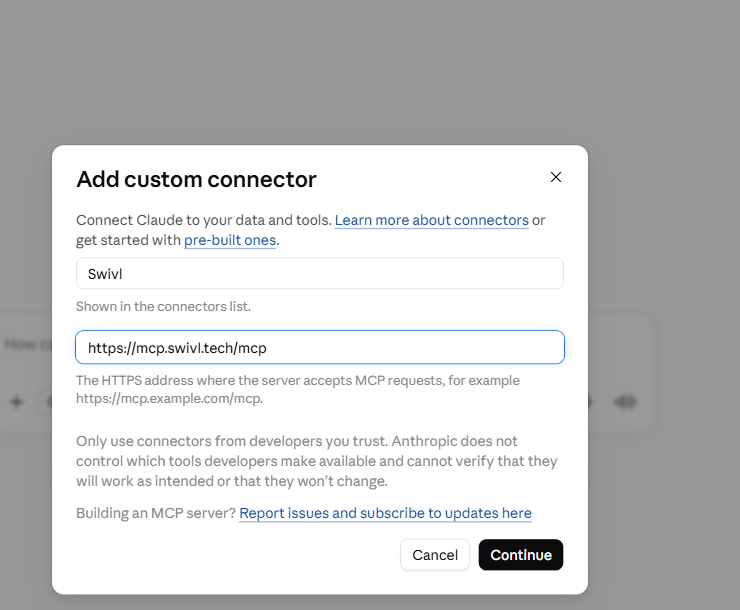
    Name it Swivl, paste the address below, hit Continue, and log in once.

Connector addresshttps://mcp.swivl.tech/mcp

The walkthrough shows Claude. ChatGPT takes the same address as a connector in its settings. Either way you sign in as yourself, so the assistant sees exactly what your Swivl login sees — no more.

Claude's Add custom connector dialog, filled in with the name Swivl and the address mcp.swivl.tech/mcp.
Recorded in Claude. Start to finish, it is about fifteen seconds.
Why bother connecting it

Plenty of contractors already write estimates in a chat window. Then they do the job twice.

The writing is the easy part, and the assistant is genuinely good at it. The trouble is everything either side of the writing.

  • It doesn't know what anything costs

    An assistant working from memory guesses at material prices. Your pricebook and your purchase history are the real numbers, and until you connect them it cannot see either.

  • Nothing it makes gets filed

    An estimate written in a chat window is a block of text. It isn't attached to a customer, it isn't on a job, and nobody on the truck will ever find it.

  • You retype everything

    You paste in the job details, read the answer, then type it into your system a second time. The assistant never learns the shape of your business because it never sees it.

What people actually ask it

Three you could run this week.

None of these is a feature we built. They are things your assistant can already do once it can see your data.

Chasing money

The receivables run you keep meaning to do

You set the rules once — who gets chased, at what age, in what tone. It reads the ledger and works through them.

It follows the rules you gave it, and tells you exactly what went out and to whom.

ClaudeSwivl connector

Anything past due, oldest first. Under 30 days a friendly nudge, over 60 firm but polite and copy me. Skip anyone on a payment plan. Write them the way I talk, not like a bank.

Six past due, $18,412 in total, two of them over 60 days. I've left the Hendricks job out — it's on the plan you set up in July.

  • INV-1471 · Ridgeway HVAC$6,05874 days
  • INV-1489 · M. Delgado$4,14361 days
  • INV-1502 · Alder Street$2,89022 days

Sent 6 reminders

Reporting

The report nobody sells, because only you want it

No report builder, no support ticket, no waiting on a feature. You describe the cut you want and it goes and gets it.

It reads your schedule: the window you booked, when the task actually closed, and who it was assigned to.

ClaudeSwivl connector

Last month, every task by tech: how long it was booked for against when it actually closed. Flag anyone consistently running over and split it by zone.

Three ran over on more than half their jobs, and the worst overruns are all in North — that zone averages 41 minutes long while the others sit inside 10.

  • Dave · North+41 min18 tasks
  • Luis · Central+8 min24 tasks
  • Tommy · South−3 min21 tasks

Ask again next month and you get the same report

Buying

Where the material money actually went

Your purchase records already hold the answer. Nobody has ever had a spare evening to add it up.

Item, quantity, cost, supplier and purchase date — straight out of your own records.

ClaudeSwivl connector

What did we spend on materials last month by supplier? Show me anything we bought more than three times and what the price did each time.

$11,240 across four suppliers. The 3-inch tablets have moved twice since June, $49.97 up to $58.40, and you've bought them nine times in that stretch.

  • Supplier A$5,91031 orders
  • Supplier B$3,18012 orders
  • Supplier C$2,1509 orders

Built from what you actually paid, not list price

So what do you want yours to do?

That is the honest pitch. We do not know what your version of this looks like, because it depends on how you run. The shop that wants a weekly list of jobs still waiting on a part is not the shop that wants every customer who hasn’t called in two years. Both are one sentence once it can see your data.

And it works the other way too: Max runs inside Swivl and knows the work. Your assistant knows how you think. Connect them and you stop being the thing in the middle carrying data back and forth.

Questions people ask first

What it can see, what it can do, and what it costs.

Your customers, jobs, tasks and schedule, your estimates and invoices, your pricebook and your materials — the same things you see when you log in. It signs in as you, so it inherits your permissions exactly. A tech who can't open financials in Swivl can't pull them through an assistant either.

It can send, and it tells you what it sent. The rules are yours: who gets contacted, at what point, in what tone, and who never gets chased at all. If you would rather check everything first, ask it to draft and hold. It will write them and wait. Either way nothing goes out that you did not ask for, and every message it sends is reported back in the conversation.

No. The connector works on the free Starter plan, which has unlimited users, customers, jobs, estimates and invoices. You will need your own Claude or ChatGPT account, and whatever that costs is between you and them.

Max lives inside Swivl and knows the work — it drafts estimates, answers the phone, and handles the jobs in front of it. Connecting Claude or ChatGPT is for the other half: picking through your own numbers, building a report that only makes sense for your shop, and writing in your voice. The connector is how the two meet.

Swivl doesn't send your data anywhere to train a model. What your assistant does with a conversation is governed by whoever you pay for it — Anthropic for Claude, OpenAI for ChatGPT — and both let you turn training off in their own settings.

That's rather the point. The examples on this page aren't features we shipped — they're things an assistant can work out once it can see your data. If you can describe what you want in a sentence, it's worth asking for.

It costs nothing to point it at your data.

Swivl’s free plan has unlimited users, customers, jobs, estimates and invoices, and the connector works on it. If you already pay for Claude or ChatGPT, you already have everything else you need.

“Excellent for startups. The support team is incredibly helpful and the free-tier features are more than enough to get started. Highly recommend for any small field service business.”
Shawn HarrisBusiness Owner · via Trustpilot
4.3/5 from 8 reviews on Trustpilot