
What is the best free invoicing app for contractors?
Swivl Starter, Wave Starter and Square Free all invoice for $0 a month. Swivl keeps the invoice on the job with scheduling and unlimited users, Wave is built for bookkeeping, and Square for payments. Joist ($17) and Jobber Core ($49) are paid after a 14-day trial.

Rob Heller
Published Nov 5, 2026
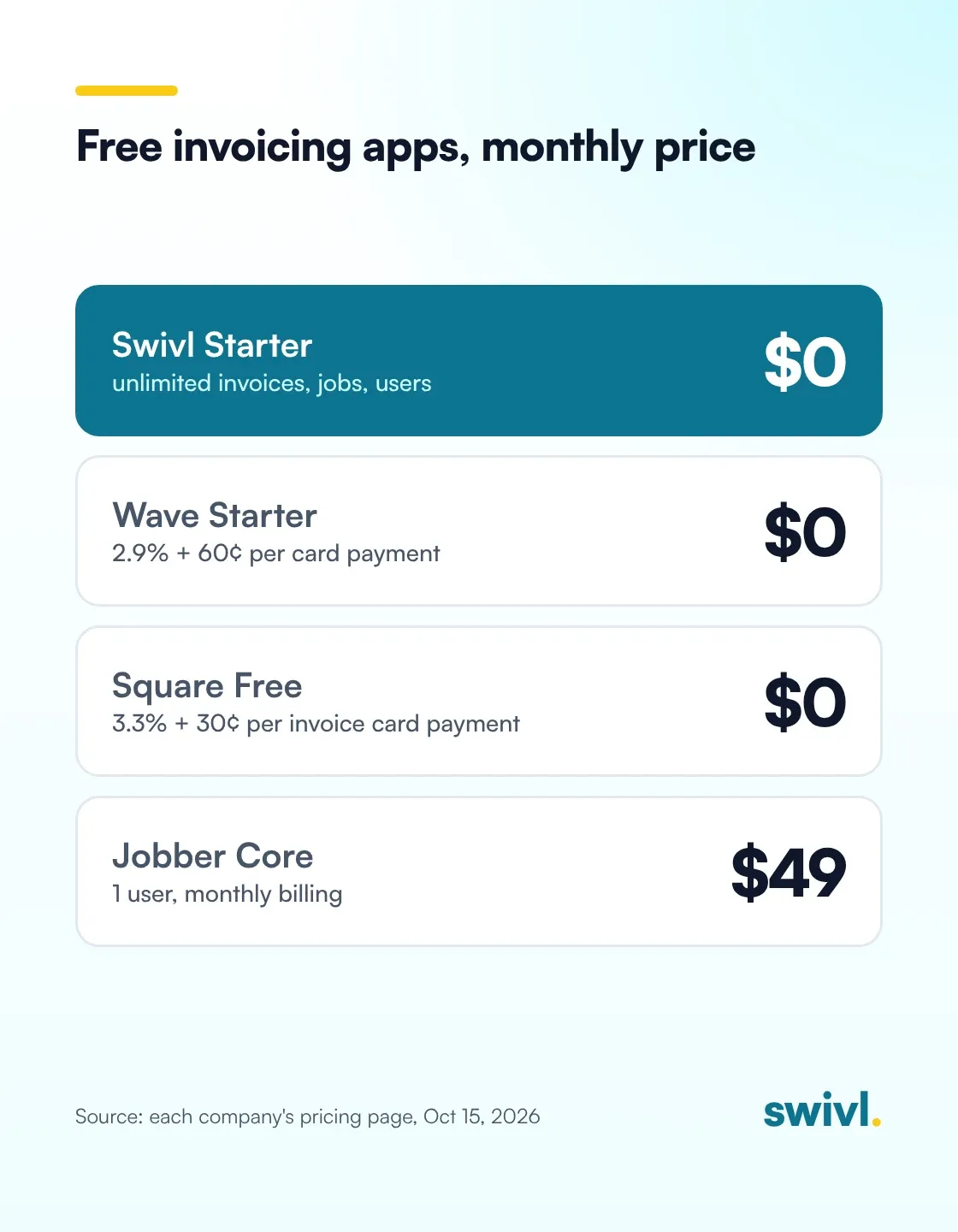
Table of Contents
Share this article
Follow us on Facebook
We post our customers’ work — the jobs, the before and afters, the trucks. Come and have a look.
For most small trades shops, the best free invoicing app is one that also keeps the job. Swivl's Starter plan is $0 a month with unlimited invoices, customers and users. Wave and Square have real free plans built for bookkeeping and payments. Joist and Jobber charge monthly after a 14-day trial.

Every app on this list can send a clean invoice and take a card. Where they differ is what the free plan leaves out, what you pay on each card payment, and whether the invoice knows anything about the job it came from.
I care about that last part because of how my plumbing company lost money in the early days. I'll get to that. First, the prices, checked on each company's pricing page on October 15, 2026.
Which invoicing apps are free for contractors?
- Swivl Starter: $0 a month, free forever. Unlimited invoices, estimates you write yourself, customers and users, plus scheduling, dispatch and the mobile app. Card payments carry the processor's fee. (pricing, checked October 15, 2026)
- Wave Starter: $0. Unlimited estimates, invoices, bills and bookkeeping records, with a mobile app. Online card payments are 2.9% + $0.60 per transaction. Automated late payment reminders come with Pro at $19 a month. (pricing, checked October 15, 2026)
- Square Free: no monthly fee. You pay processing when you take a payment, and card payments made online or through an invoice are 3.3% + 30¢. Square Plus is $49 a month per location and drops that to 2.9% + 30¢. (pricing, checked October 15, 2026)
- Joist: the free plan is gone. After a 14-day trial, Basics is $12 a month for up to 5 documents, Pro is $17 for unlimited documents and clients, and scheduling is on Run at $100 a month. (pricing, checked October 15, 2026)
- Jobber: no free plan. Core is $49 a month for one user on monthly billing, or $29 a month billed annually, after a 14-day trial. (pricing, checked October 15, 2026)
- Housecall Pro: no free plan. Basic is $59 a month billed annually, after a 14-day trial. (pricing, checked October 15, 2026)
So three of these are free for real: Swivl, Wave and Square. The other three are good products you pay for once the trial ends. More on those in Is Jobber free?
What does each free invoicing plan leave out?
Wave is accounting software first. Its free plan does bookkeeping well, and if your accountant wants clean books, that matters. Its pricing page doesn't list scheduling or job tracking, and on the free plan you'd chase late payers yourself, because automated reminders are on Pro.
Square is a payments company first. If you already take payments through Square, keeping invoices in the same account is easy, and there's no subscription to start. The cost shows up per payment: on a $1,200 water heater swap paid by card through an invoice, 3.3% + 30¢ comes to $39.90.
Joist and Jobber are built for contractors. Joist does good-looking estimates and offers homeowner financing. Jobber Core gives a solo operator online booking and invoicing in one plan. Neither has a free plan anymore.
Swivl's Starter plan is built around the job. In Swivl, a job is the folder for the work: the estimate, the scheduled visits, the photos, the invoice and the payment all sit inside it. The trade-off on Starter is credits: it includes 250 a month and can't buy top-ups, so a shop sending a lot of text reminders would need Growth.

A short on invoicing in Swivl. The invoice goes out by text in one tap, the customer pays from her phone, and the deposit lands before the tech is back in the truck. The description says invoicing is free in Swivl.
Why did invoicing matter so much at my plumbing company?
When I started out, the work came in by text from the field and the invoices didn't get turned in. We couldn't keep track of them. I remember finding invoices on the floorboard of a truck, and just losing it when I found out how much money we'd spent and never charged for. It happened again and again.
We did a lot of small jobs, not big ones, so keeping track of them all was a real challenge. That's literally why we started a basic spreadsheet, just to keep track of the jobs coming in. That spreadsheet was the beginning of Swivl.
Later, cash flow was our biggest challenge. A lot of our customers were commercial and property management companies, and they didn't pay fast. A property manager might run bills once a week. Miss that run and you've added at least seven days to your payment cycle. Add those days to every receivable you have and it comes to a lot of money.

So I learned to compress the one thing I could control, which was how fast the invoice went out. We sent invoices right after the job closed. The software also tracked how many days each customer was past due, which helped us stick to our rules. The longest I ever waited to get paid was six months, and that meant going through the whole recovery process.
How do other trades owners handle invoicing?
Matt Navin took over AAA Rooter, the drain cleaning company his grandfather started in Berlin, Connecticut. On his Swivl Sessions episode, he named the paperwork as the hardest part of taking over.
“The paper invoices have been killing me.”
Lee Killingsworth has run Lee's Unlimited in Huntsville, Texas, for almost 30 years. He liked his paper invoices until a homeowner expected him to remember exactly what he'd fixed two years earlier. On his episode, he put the benefit of moving off paper simply.
“We're not having to remember everything in our head 100% of the time.”
A short clip from Swivl Sessions. Lee Killingsworth of Lee's Unlimited loved his paper invoices. The trouble came two years later, when a homeowner expected him to remember exactly what he fixed last time, and that's when Lee's Unlimited started using Swivl.
What's free in Swivl's invoicing, and what costs credits?
Free on every plan, including Starter: unlimited invoices, estimates you write yourself, customers and users. Scheduling and dispatch, the mobile app for iOS and Android, the price book, reports and email automations are free too. There's no contract and no per-seat charge.
Credits pay for things that cost us money to run. A text reminder is 1 credit, while an email reminder costs nothing. The AI Estimator runs about 60 credits an estimate, and writing an estimate yourself is always free. Starter includes 250 credits a month, and Growth is $49 a month with 1,500 credits. Card payments carry the payment processor's fee on every plan.
Every new account starts with 14 days on Scale Pro with no card required, then moves to Starter unless you pick a paid plan. If you only need to send invoices and get paid, Starter covers it.
How do you pick the right free invoicing app?
Start with what you'd lose sleep over. If it's the books and tax time, Wave's free plan is a solid choice. If you already run your payments through Square, its free plan keeps everything in one place, as long as you're fine with the per-payment fee.
If what keeps you up is jobs slipping through the cracks, techs not turning in tickets, or not knowing who still owes you, pick the app that keeps the invoice on the job. That's the problem Swivl started from, and Starter costs $0 for as many people as you have on the crew.
Whichever you pick, send your next invoice from it the day the job closes. Swivl includes a free 30-minute onboarding call on every plan if you'd like help getting set up. More on this: contractor invoicing software, how to get paid faster and the invoicing and payment flow.
Frequently asked questions
Is there a completely free invoicing app for contractors?
Yes. Swivl Starter, Wave Starter and Square Free all cost $0 a month. Swivl adds scheduling and unlimited users on the free plan. Wave and Square charge a fee on each card payment, and so does every app that takes cards.
Does Jobber have a free invoicing plan?
No. Jobber offers a 14-day free trial. After that, Core is $49 a month for one user on monthly billing, or $29 a month billed annually, per its pricing page on October 15, 2026.
Is Joist still free?
No. Joist's pricing page says its free plan is no longer available. There's a 14-day trial, then Basics is $12 a month for up to 5 documents and Pro is $17 a month for unlimited documents.
What do invoicing apps charge for card payments?
On October 15, 2026, Wave's free plan charged 2.9% + $0.60 per card transaction, and Square Free charged 3.3% + 30¢ for cards paid online or through an invoice. In Swivl, card payments carry the payment processor's fee.
Can I send invoices from my phone on the free plan?
Yes, with all three free options. Swivl's mobile app for iOS and Android is free on every plan, Wave lists invoicing on the go with its mobile app, and Square includes invoices in its free plan.
Free to start. No contract. No sales call.
Start freeReady to transform your business?Transform your business
Join thousands of contractors already growing with Swivl's AI-powered platform.